Live on a shelter floor

For animal shelters

The board that never gets erased

Every shelter runs on a whiteboard. ShelterBoard is that board, live on every phone in the building — and it keeps everything the eraser takes.

Syncs with Shelterluv — your dogs and photos, kept current every hour

Your shelter's admin sets up accounts. It runs in any browser, and there's an iPhone app for the floor.

DogKennelOutBack
BenjiA-129:1510:40
PastramiB-0411:0012:20
RangerA-071:302:15
PoppyC-022:453:30

Today's board42 dogs

  • BenjiA-12Out 42m
    Taken out 9:15 AM by Dana R.
  • PastramiB-04Needs an outing
    Last out 2 days agoSee staff
  • RangerA-07In
    Back 2:15 PM yesterday · 41 outings on fileVolunteer approved

Now in pilot

ShelterBoard is in daily use at a large animal shelter in the Los Angeles area, on the floor with its staff and volunteers — and shaped by what they ask for.

The trouble with a whiteboard

It tells you what's true right now, and nothing else. It can't tell you that Pastrami hasn't been out since Sunday, that the last two volunteers both noted she pulls hard on the left, or who had Benji this morning. By Monday, none of it happened.

A day on the floor

At the kennel door

Every dog, one view

The board lists every dog in your care with their state right now — in, out, or overdue for an outing. It's the same view on a phone in the kennel, a tablet at the front desk, and a laptop in the office, and it refreshes itself.
When a dog goes out

One tap out, three taps back

A volunteer taps Take Out and the board updates for everyone. Bringing the dog back is three taps — Bring back, what you did, done — and one more to say where a walk went. Nobody hand-writes a time.

What the next volunteer needs

Notes that stay with the dog

Pulls hard on the left. See staff before handling. That travels with the dog through every outing and every shift, instead of living in one person's memory. Write your own note templates for the return form, so “good boy” stops being the whole report.

Before anyone picks up a leash

Cleared dogs only

Staff mark which dogs are cleared for volunteers. Everyone can still see and read about every dog, but a volunteer can only take out the ones that are cleared — the server refuses the rest, so it isn't just a hidden button.

When it isn't a match

Cancel, with a reason

A volunteer who finds a dog isn't the right fit can cancel the outing and say why. The dog goes straight back on the board, the cancelled outing doesn't count as time out, and the reason stays on the dog's history for the next person.

End of shift

Staff see the week, not the moment

A sortable weekly view of who went out and when, so a coordinator can tell at a glance which dogs are being missed. A walk that happened with the phone in a pocket can be added afterwards with its real times and counts like any other, marked as logged later — and outings left open overnight close themselves rather than sitting there wrong.

Works with Shelterluv

Your dogs are already here

If your shelter runs on Shelterluv, connect it once and ShelterBoard fills itself in. An admin pastes your Shelterluv API key into settings, previews exactly what the first sync will do, then switches it on. The key is checked with Shelterluv and stored encrypted.

Not on Shelterluv? Staff add and edit dogs in ShelterBoard directly.

Your roster, every hour
Every dog in custody arrives with their name, animal ID, kennel and photo, and stays current on its own. Nobody retypes an intake.
Holds stay off the volunteer board
Pick the Shelterluv statuses that mean “not for volunteers” and those dogs disappear from volunteers' boards while staying visible to staff.
Approval can live in Shelterluv
Name the attribute your team already uses for volunteer clearance and ShelterBoard follows it. Leave it blank and staff set approval in ShelterBoard instead.
It won't overwrite your floor's work
Special instructions and handling notes belong to ShelterBoard, and the sync never touches them. A dog that leaves the feed is marked departed, not deleted, with its outing history intact.

Reporting

The record is yours to take

Every outing is a row you can count. Take it to a board meeting, a grant report, or the dashboard your shelter already runs on.

In the inbox on Monday
Staff who want it get last week's outings by email at 8am Monday, on your shelter's clock, with the spreadsheet attached. Each person switches it on for themselves.
A CSV whenever you want one
Export this week or everything: one row per outing, with the dog, the volunteer, the type, the times and the notes. The columns never move, so it opens in Excel and a Power BI report built on it keeps refreshing.
An API for the dashboard
Create a key in settings and your reporting tool pulls the same outings as JSON on its own schedule. Keys belong to your shelter, show when they were last used, and can be revoked from the same screen.

Yours, not ours

It looks like your shelter

Set your own colors and logo and the whole board follows — on the wall display, on volunteers' phones, and in the emails that invite them. Volunteers see your shelter, not a piece of software. It follows each device into dark mode too, with your palette re-tuned so it stays legible.

Your own words

Outings you name yourself

Walk, playgroup, training, a trip to the park — the kinds of outing volunteers pick from, and the places they happen, are lists you write. Retire one and it stops being offered, while the history that used it keeps its name.

On iPhone

The board, in a pocket

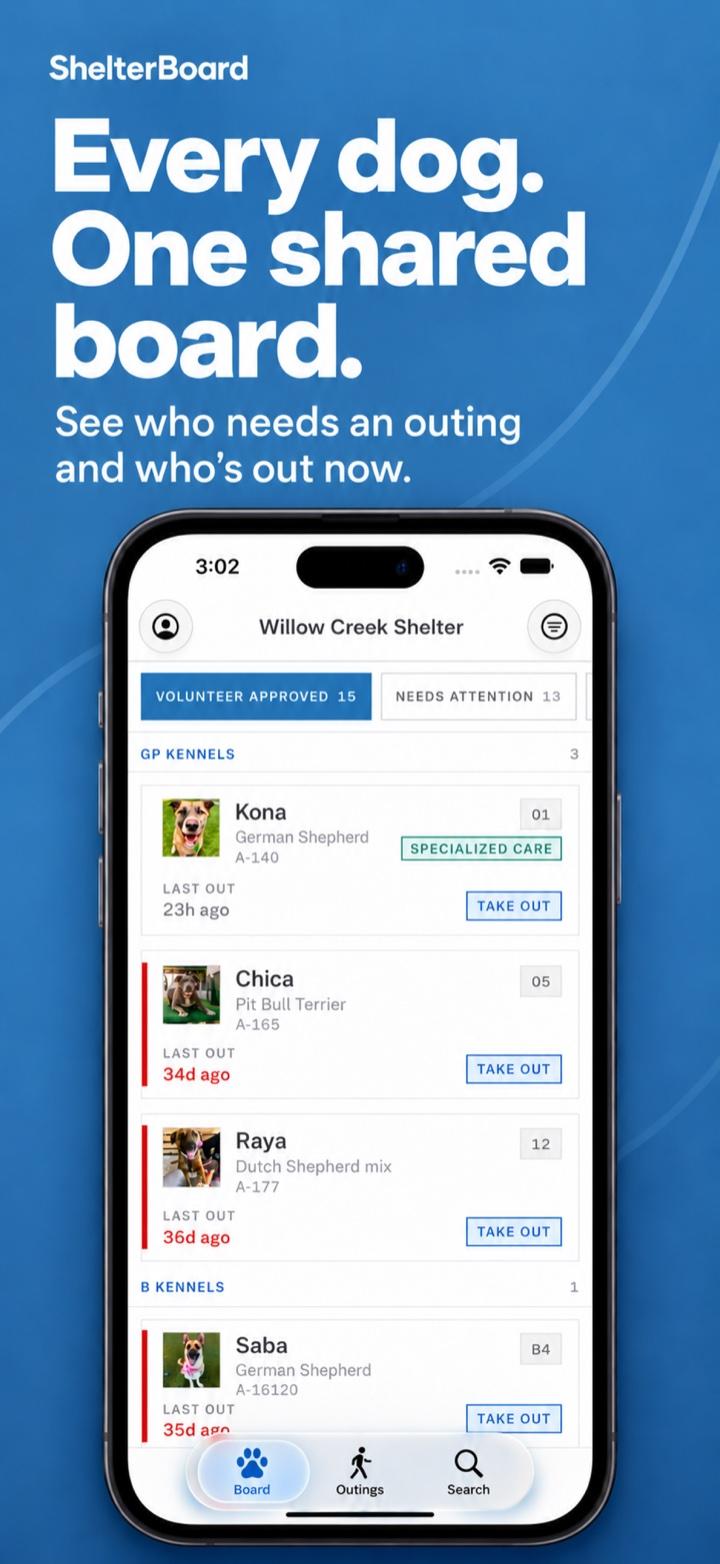
The floor's half of ShelterBoard is also an iPhone app: find a dog, take them out, bring them back, and read what the last volunteer wrote. An outing in progress sits on the lock screen with a running timer, and the phone nudges you an hour in if the dog is still out. Same account, same board as the browser.

Get it on the App Store
The board on an iPhone, listing dogs by kennel with a Take Out button

Built to be trusted with the record

How your records are kept safe
Nothing is lost
Dogs who leave the shelter are kept with their history, and removed outings are hidden, not erased.
Every change is logged
Who changed what, and when.
Backups checked nightly
Each one is restored and compared before it counts.

Questions

What shelters ask first

Something not here? Write to us — it reaches the person who builds it.

Ask a question
Do we need to be on Shelterluv?

No. Staff can add and edit dogs in ShelterBoard directly. If you are on Shelterluv, connecting it fills the board in for you and keeps it current every hour.

Does it replace our shelter management software?

No. It does the whiteboard's job — who's in, who's out, who's been missed, and what the last handler noticed — and leaves intake, medical records and adoptions to the system you already run.

What do volunteers need to use it?

A phone with a web browser. Your admin invites each person by email; there's no public sign-up. Volunteers with an iPhone can use the app instead, which keeps a running timer on the lock screen while a dog is out.

What happens when there's no signal in the kennels?

Taking a dog out or bringing one back needs a connection, so the board never shows a change that didn't reach it. If a walk happens with no signal, it can be added afterwards with its real times. It's marked as logged later and counts like any other outing.

Who owns the data, and can we take it with us?

Your shelter does. Staff can export every outing as a spreadsheet at any time, or pull it into a dashboard through the API. If you leave, ask and we'll delete your shelter's records permanently. We don't sell data or share it with advertisers.

What we keep, and why
How is pricing worked out?

Per shelter, not per volunteer, so adding people to the board never costs more. Tell us roughly how many dogs you hold and we'll come back with a number.

What's included
Will it pass our IT review?

Every request is checked on the server against the person's shelter and role, data is encrypted in transit and on disk, and the database is backed up nightly — each backup restored and checked before it counts.

The detail your IT team will want

Bring your board to every shift

Tell us how your shelter runs today and we'll show you what it looks like on ShelterBoard.